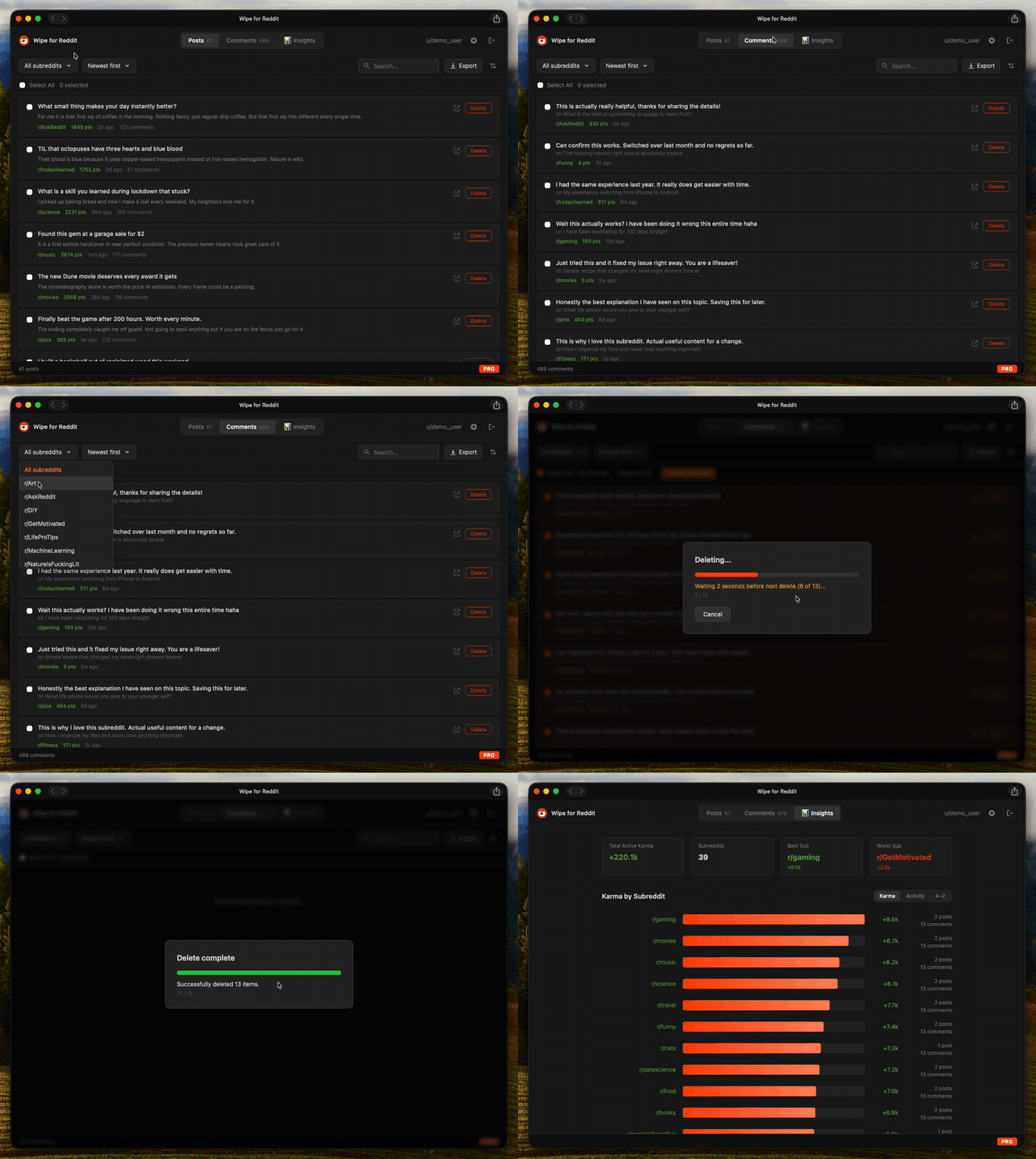
Sort by karma. Find your most downvoted takes. Bulk delete the cringe. See your full subreddit breakdown. Export the keepers. Everything runs on your machine.
Why it matters
Every post, every reply, every hot take - indexed, searchable, and permanently linked to your username. Anyone can read all of it.
of employers research candidates online before making a hiring decision
of comment history the average long-time Redditor has publicly visible right now
data we collect. No servers, no analytics, no tracking. Everything stays on your machine.
That heated argument from 2019? Still there. That joke that didn't age well? Still there. All it takes is your username.
Your posts get indexed, archived, and sold. Deleting from Reddit is the first step to reclaiming your privacy.
Location mentions, workplace hints, personal stories - your comment history is a breadcrumb trail to your real identity.
No cloud. No servers. No accounts to create. Your data never leaves your computer. Not even to us.
Features
No browser extensions. No sketchy web apps. No data leaves your device. Just a clean desktop app that does one thing really well.
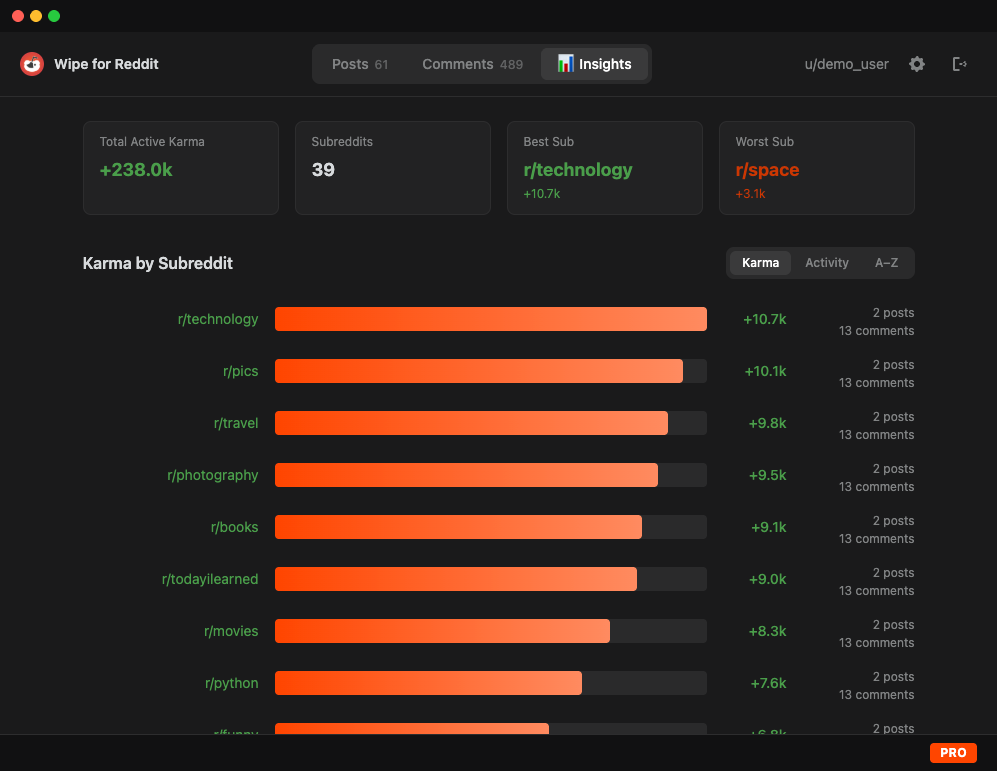
See your karma by subreddit at a glance. Total karma, best sub, worst sub, post count, comment count - all in a sortable dashboard.
Select all. Delete all. Wipe an entire subreddit, nuke your oldest posts, or purge everything at once. Cancel mid-operation anytime.
Sort by least karma to surface your most downvoted posts and comments first. Find the takes that aged like milk and delete them.
Newest first, oldest first, most karma, least karma. Filter by subreddit. Full-text search. Find anything in seconds.
Everything runs on your machine. No servers, no cloud, no analytics. Your Reddit credentials go directly to Reddit - we never see them.
Built-in random delays between deletions to stay under Reddit's radar. Live countdown between each delete so you always know what's happening.
Back up your posts and comments as JSON before deleting. Keep a local copy of everything. Pro feature.
Posts and comments are cached locally after your first fetch. Instant loading on every return visit. Hit refresh for fresh data.
macOS, Windows, and Linux. Same app, same features, every platform.
Insights
See exactly where your karma comes from - and where it tanks. Sort by karma, activity, or alphabetically. Click any sub to jump straight to those posts.
Rank your subreddits by total karma. See where you're farming upvotes and where you're hemorrhaging karma.
Switch to activity view to see where you've been most active - by total post and comment count per sub.
Click any subreddit in the chart to jump to that sub's posts, filtered and ready to review or delete.
How it works
Three steps. No accounts to create. No permissions to grant. No data sent anywhere.
The app isn't code-signed yet, so your OS will show a security warning on first launch. This is normal for independent apps - you only need to do this once.
Select your OSDouble-click Wipe for Reddit after installing. A warning will appear saying "Wipe for Reddit" can't be opened because Apple cannot check it for malicious software (or similar). Click Done, don't move it to Trash.
Open System Settings (Apple menu โ System Settings). Go to Privacy & Security and scroll to the Security section at the bottom. You'll see: "Wipe for Reddit" was blocked to protect your Mac.
Click Open Anyway, then enter your admin password if prompted. The app will launch, and future opens work normally.
Double-click the
Wipe for Reddit Setup.exe.
Windows Defender
SmartScreen will show a blue warning:
"Windows protected your PC" - this appears because
the app is new and doesn't have a reputation with Microsoft
yet.
Click the More info link on the warning. A Run anyway button will appear - click it. The installer will proceed normally. You only need to do this once.
Download the
.AppImage
file from the
releases page. No installation
needed.
Right-click the file โ Properties โ
Permissions tab โ check
Allow executing file as program. Or run:
chmod
+x WipeForReddit-*.AppImage
That's it. Double-click the AppImage to launch. Works on most distributions including Ubuntu, Fedora, and others.
~/Applications) to
keep things tidy.
Click "Sign in with Reddit" - a real Reddit login page opens inside the app. Sign in normally. 2FA and captcha work. Your credentials go directly to Reddit, never to us.
Your content loads into separate tabs. Sort by newest, oldest, most karma, or least karma. Filter by subreddit, search by keyword, or check the Insights tab for your full karma breakdown.
Click delete on individual items, or select multiple and bulk delete (Pro). Each deletion has a built-in delay to stay under Reddit's radar. You can cancel a bulk delete at any time.
Pricing
Free to browse and delete 10 items a day. Grab Pro for unlimited access - one-time purchase, no subscription.
After activating your license, restart the app to unlock Pro features.
Get ProFAQ
Support
Found something broken or want to contact us? Let us know and we'll fix it.